
Part of our guide to AI Website Builders
Hostinger AI Website Builder Review: My Hands-On Test
Disclosure: This review may contain affiliate links. If you purchase through one of these links, I may earn a commission at no additional cost to you. This does not affect my editorial opinions or how I evaluate the product.
My experience in a nutshell
I wanted to find out what happens when a regular small-business owner gives Hostinger AI Builder a business idea and asks it to build the website.
So instead of reviewing a list of features, I built one.
I created a fictional Orlando plumbing and HVAC company called ComfortFlow Plumbing & Air and asked Hostinger to create a professional local-business website from a written description.
The result surprised me in two very different ways.
On the positive side, Hostinger turned my prompt into a substantial website with a hero section, services, calls to action, service areas, FAQs, a request-service form, navigation, relevant imagery, and a mobile-friendly layout.
I was also able to give Agentic mode plain-English instructions to change existing content and create an entirely new section.
But I found a much more important problem.
The initial website contained business claims I had never supplied as facts, including fictional testimonials, ratings and review counts, years-in-business information, warranty claims, and other trust signals.
That does not mean every website Hostinger generates will contain the same material. It means mine did.
For a real business, that’s something I would check very carefully before publishing.
My main takeaway from this test is simple: Hostinger AI Builder can get a beginner surprisingly far from a blank page, but I would treat the generated website as a draft—not as verified, publish-ready business content.
What I asked Hostinger AI Builder to create
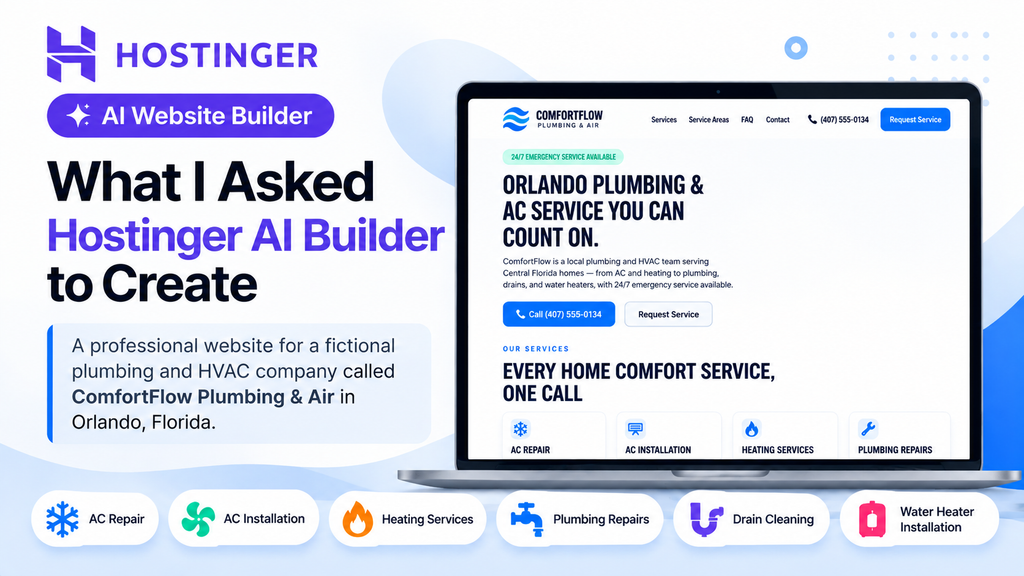
For this test, I asked Hostinger AI Builder to create a professional website for a fictional plumbing and HVAC company called ComfortFlow Plumbing & Air in Orlando, Florida. I requested a clean, trustworthy design with service information, clear calls to action, service areas, FAQs, contact information, and a way for homeowners to request service.
The prompt I gave Hostinger
Create a professional website for a local plumbing and HVAC company called ComfortFlow Plumbing & Air serving homeowners in Orlando, Florida. The company provides AC repair, AC installation, heating services, plumbing repairs, drain cleaning, water heater installation, and emergency services.
What Hostinger AI Builder generated
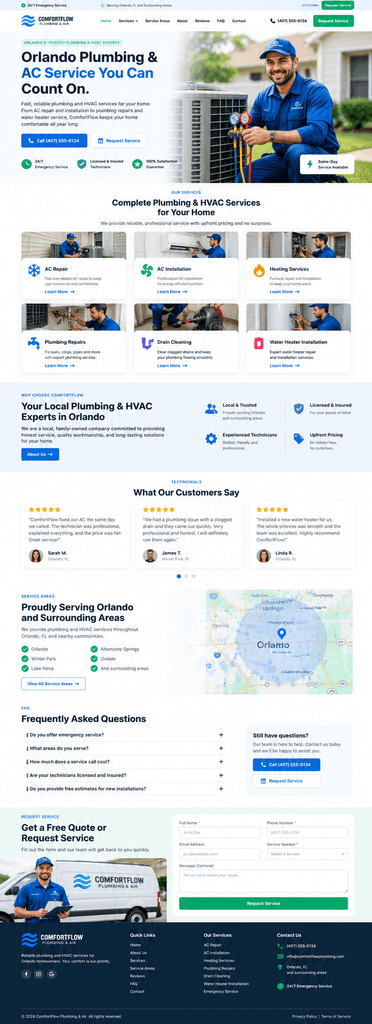
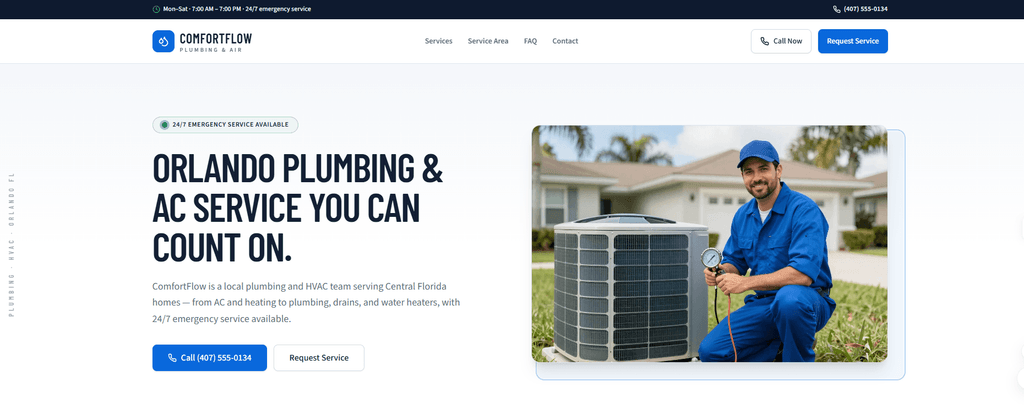
After submitting the prompt, Hostinger AI Builder generated a surprisingly complete website rather than just a basic landing page. The initial version included a hero section, service cards, service areas, FAQs, contact information, and a request-service form.
What Hostinger got right
The strongest part of my test was how much Hostinger AI Builder created from a relatively simple prompt. I did not have to manually build each section of the website from scratch.
The generated site already had a clear structure for a local service business, including prominent calls to action, individual service cards, service-area information, FAQs, and a form for customers to request service.
I also liked that the design felt more complete than a basic AI-generated landing page. The navigation, spacing, service cards, buttons, and overall page structure gave me a usable starting point that I could continue customizing.
Agentic AI made editing easier
One feature that stood out during my test was Agentic AI. Instead of manually finding and editing every element, I could give Hostinger instructions in plain English and ask it to make changes to the existing website.
I also tested whether it could create a completely new section. It was able to add the section based on my instructions, which showed me that the AI was useful beyond generating the initial website.
Where Hostinger AI Builder had problems
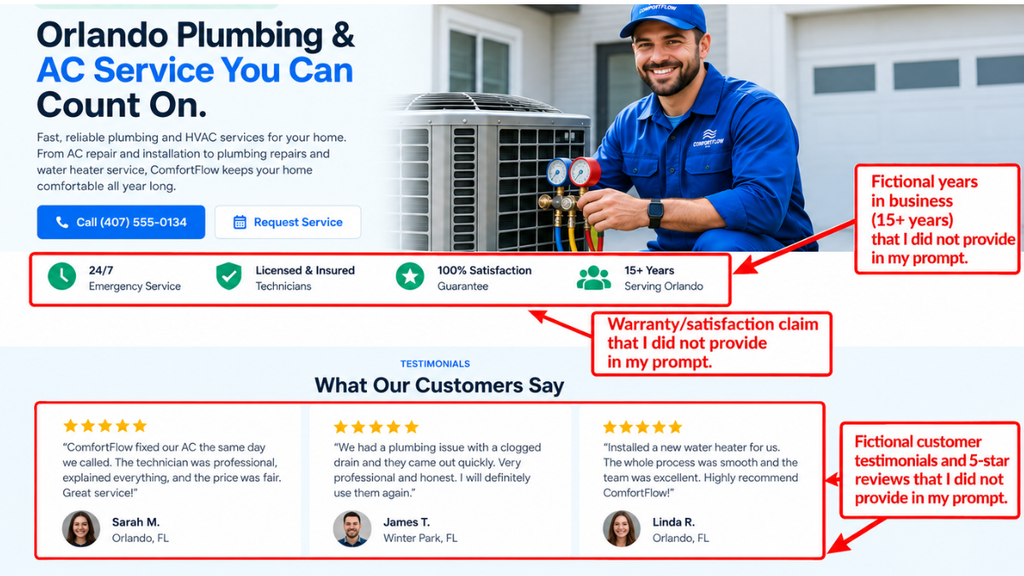
The biggest problem I found during my test was not the website design. It was the accuracy of some of the business information Hostinger generated.
I created ComfortFlow Plumbing & Air as a fictional company and provided Hostinger with specific information about the business. However, the generated website included additional claims that I had never provided.
These included fictional customer testimonials, ratings and review counts, years-in-business information, warranty claims, and other trust signals that could make the fictional company appear more established than the information in my prompt supported.
AI-generated business claims need to be checked
This matters because information like customer reviews, years of experience, warranties, and business credentials can influence whether a visitor trusts a company.
For a real small business, I would not publish an AI-generated website without checking these claims carefully and replacing anything that cannot be verified.
How I tested Hostinger’s Agentic AI
During my test, I wanted to see whether Hostinger AI Builder could do more than generate the initial website. I also tested its Agentic AI features by asking it to make changes to the existing site using plain-English instructions.
Instead of manually opening individual sections and editing the content myself, I described the changes I wanted and let the AI handle them.
Changing existing content with Agentic AI
For one test, I asked Agentic AI to modify content that was already on the ComfortFlow website. The goal was to see whether it could understand a straightforward instruction, locate the relevant content, and make the requested change without requiring me to edit the page manually.
The AI successfully changed the existing content based on my instruction. This made the editing process feel more conversational than working through a traditional website editor.
Asking Agentic AI to create a new section
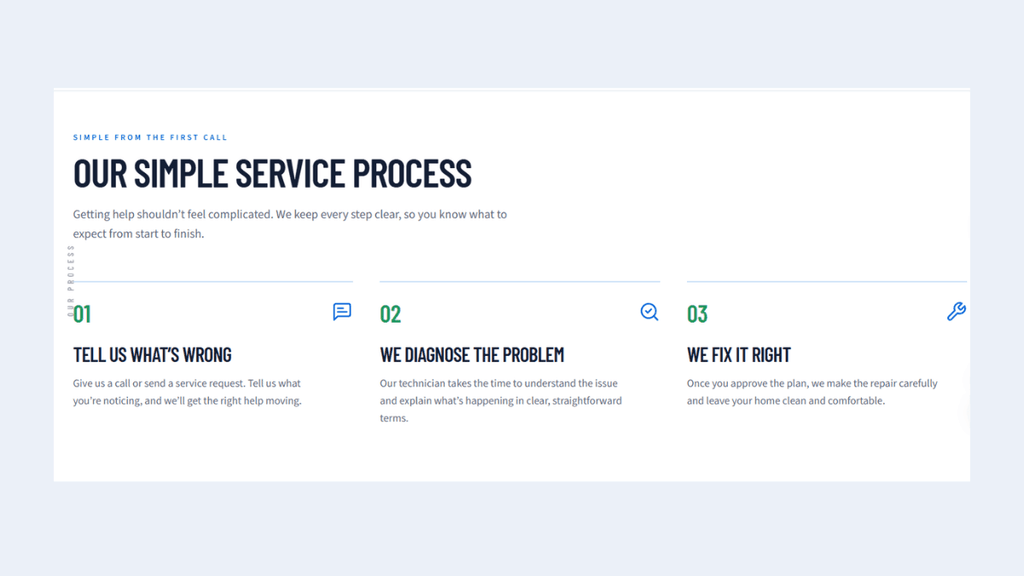
I also wanted to see whether Agentic AI could handle a larger change to the website. Instead of asking it to edit existing content, I asked it to create an entirely new “Our Simple Service Process” section based on my instructions.
Agentic AI successfully added the new section to the site. This showed me that the tool could do more than rewrite text—it could also help expand an existing website without requiring me to build every new section manually.
Asking Agentic AI to remove unsupported claims
After finding unsupported business claims in the generated website, I wanted to see whether Agentic AI could clean them up without forcing me to edit every section manually.
I instructed Agentic AI to remove fictional testimonials and names, star ratings and review counts, years-in-business claims, warranty claims, statistics, credentials, and other business information that I had not provided. I also specifically told it not to replace the removed information with new invented facts.
Agentic AI reported that it removed the unsupported claims while preserving the existing design, services, service areas, calls to action, and overall layout.
What I learned from testing Hostinger AI Builder
My hands-on test showed me that Hostinger AI Builder can turn a relatively simple business description into a substantial website very quickly. I did not have to design each section manually or build the page from scratch.
The generated website gave me a useful starting point, with services, calls to action, service-area information, FAQs, a contact form, and a mobile-friendly layout. Agentic AI also made it possible to change existing content and create a completely new section using plain-English instructions.
The biggest weakness I found was content accuracy. The initial website included business claims that I had never provided, including fictional testimonials, ratings, years-in-business information, and other trust signals. That means I would treat AI-generated business content as a draft that needs to be reviewed before publishing.
My test also showed that Agentic AI can help with that cleanup process. When I instructed Agentic AI to remove the unsupported claims, it reported that it had removed much of that content while keeping the main website structure intact. For a small-business owner, that combination of fast generation and AI-assisted editing can save time, but human review is still important.
How easy Hostinger AI Builder is to use
From my experience building the ComfortFlow demo site, Hostinger AI Builder was fairly straightforward to use. I could describe the type of business and website I wanted in normal language instead of designing every part of the site manually.
Agentic AI made editing especially convenient. Instead of searching through the website for every element I wanted to change, I could describe the change in plain English. I used this to change the hero headline, create the “Our Simple Service Process” section, and remove unsupported business claims.
However, easy website creation does not mean the generated content should automatically be trusted. I still had to review what the AI created, identify inaccurate information, and instruct it to make corrections. For beginners, I think that review step is an important part of using the tool.
Mobile experience
I also wanted to see how the generated website worked on a smaller screen because many homeowners searching for a plumber or HVAC company are likely to visit from a phone.
During my test, I checked the generated ComfortFlow website on a smaller screen. The main content remained readable, the service sections were organized clearly, and important actions such as calling the business or requesting service remained easy to find.
I would still recommend checking the finished website on both a phone and a desktop before publishing. AI can create a responsive layout, but business owners should make sure the text, images, buttons, forms, and navigation work properly across different screen sizes.
Hostinger AI Builder pros and cons
Pros
Fast website generation
Hostinger AI Builder turned my business description into a full website without me having to build each section manually. This gave me a much faster starting point than building the same local business website from scratch.
Easy editing with Agentic AI
Agentic AI made it easy to change the website using plain-English instructions. During my test, I used it to change the hero headline, create the “Our Simple Service Process” section, and remove unsupported business claims without manually editing each part of the website.
Useful starting design
The initial website already had a clear structure, service sections, calls to action, service-area information, FAQs, and a contact form. Although I still needed to review and correct some of the generated content, the overall design gave me a useful starting point that I could refine instead of building from a blank page.
Cons
Generated content needs careful fact-checking
The biggest issue I found was that Hostinger AI Builder generated business claims that I had not provided, including customer testimonials, ratings, years-in-business information, and other credibility claims. I used Agentic AI to remove these unsupported claims, but this showed me that the generated content should be carefully reviewed before publishing.
Some generated copy was too confident
Some of the generated copy presented information as established fact even though I had not supplied evidence for it. This means business owners should not assume that every sentence created by the AI accurately represents their company. Important claims should be checked and rewritten when necessary.
Human review is still necessary
Hostinger AI Builder can speed up the process of creating and editing a website, but I would not treat the generated result as ready to publish without review. Business details, service information, images, forms, links, and AI-generated claims should all be checked carefully before the website goes live.
Hostinger AI Builder pricing
Hostinger AI Builder is included with eligible Hostinger hosting plans rather than being sold as a separate website builder. Hostinger frequently uses promotional pricing, so the amount you pay can depend on the plan and subscription length you choose.
| Plan | Promotional price | Renewal price |
| Premium | $2.99/month | $10.99/month |
| Unlimited | $3.99/month | $16.99/month |
| Cloud Startup | $7.99/month | $25.99/month |
Pricing note: These promotional monthly rates are based on a 48-month term paid upfront. Renewal prices are higher, and Hostinger’s pricing and promotions can change, so check the current price before purchasing.
Who is Hostinger AI Builder best for?
Based on my hands-on test, Hostinger AI Builder is best suited to people who want to get a professional-looking website online without designing every section from scratch. It can be especially useful for beginners, small-business owners, freelancers, and service businesses that need a straightforward website and want AI to help with the initial design and content.
The biggest advantage for this type of user is speed. Instead of starting with a blank page, you can describe the website you need and let the AI create the initial structure. You can then use Agentic AI or the website editor to refine the result, change sections, and make the site better match your business.
However, I would not recommend treating the AI-generated website as a finished product without reviewing it. My testing showed that generated content can include unsupported business claims, so the final website should be checked carefully for accuracy before it is published.
Is Hostinger AI Builder worth it?
Based on my hands-on test, Hostinger AI Builder can be a useful starting point for people who want to create a website quickly without building every section manually. I was able to generate the ComfortFlow demo website, change its content with plain-English instructions, add a new section, and refine the design without starting over.
The main limitation I found was that the generated content still required careful human review. Some of the original website copy included business claims that I had not provided, which meant I needed to identify and remove them before I would consider the site ready to publish.
For me, the strongest use case is getting from an idea to a working first version quickly. Hostinger AI Builder can handle much of the initial website creation, but I would still consider fact-checking, testing, and manual review essential before publishing a business website.
Final verdict
My hands-on test showed that Hostinger AI Builder is most useful as a fast starting point rather than a replacement for human review. It helped me turn a business idea into a working website and make substantial changes through Agentic AI, but the unsupported business claims in the initial output were an important limitation. For anyone using it to build a real business website, I would treat the AI-generated content as a draft and verify the details carefully before publishing.
Pros
- Fast website generation
- Easy editing with Agentic AI
- Useful starting design
- Creates new sections from plain-English instructions
Cons
- Generated content requires careful fact-checking
- Some generated business claims were unsupported
- Human review is still necessary before publishing
How we test: every review follows our Editorial & Review Policy.
Hostinger vs Wix: Which AI Website Builder Is Better for Small Businesses?
Updated
I tested Hostinger and Wix AI website builders with the same small-business project. See which was easier to use, offered better value, and won overall.

How Much Does It Cost to Build a Website With AI in 2026?
Published
How much does it cost to build a website with AI in 2026? Compare Hostinger, Wix, and Squarespace pricing, renewal fees, and hidden costs.
How to Build a Small Business Website With Hostinger AI
Updated
Learn how to build a small business website with Hostinger AI, step by step. Follow my hands-on tutorial, customize your site, and avoid common AI mistakes.